Generate an AI Video Resembling A Person's Motion
Introduction
There are videos floating around online where you see a still image, possibly a character or celebrity. Then someone records themselves making facial expressions, essentially animating and resembling that same still image.
The model possibly being used for this is the state-of-the-art Wan-Character. Alibaba originally released Wan 2.2, the open-source video generation model, in late July 2025. Then, in September, 'Wan-Animate' followed, building on top of Wan 2.2, where it takes an image reference and a video to generate an animation of the image.
This lead me to investigate how these two inputs (image reference + video reference) fit into the video generation pipeline to produce such a convincing animation.
Before we explore this, we first need to have a general background of video generation.
Some General Background
- To generate a video, the video model initially needs to be trained from a dataset before it can create new samples. A common generative framework used is diffusion.
- In diffusion, noise is gradually added to clean data in a forward process. The model then learns to reverse this noise in a reverse process, called 'denoising'. Through this iterative denoising procedure, the model learns the underlying data distribution, allowing it to generate similar samples.
To represent data consisting of sequences of moving frames, a VAE is utilized. Because modeling high-dimensional data directly is inefficient, the VAE compresses this data into latent space (encoder) so it can be processed inside, then reconstructs it afterward (decoder).
Inside, DiT blocks are used to process latent data (hidden, abstract features of the video). The video model contains DiT blocks that model global patterns during training and align the generation with from a text embedding (the text prompt)
During training, only the DiT blocks are updated while the VAE and text encoders remain untouched. The model learns to denoise noise into structured image/video from billions of examples, associating it with text.
Once trained and during inference, if someone typed "A futuristic city at night containing robots..." as the text prompt, there may have been a text/image/video pair from the dataset that the model learned from with something similar, and it will generate it.
Side note:
Wan 2.2 uses flow matching instead of diffusion, improving efficiency 1
Wan 2.2 uses a modified version of a VAE called Wan-VAE, which is specialized for video
Guiding the Video Generation Model
In Wan-Animate , if no text prompt is provided, the source code reveals a default value: config.prompt = '视频中的人在做动作' (The people in the video are performing actions), as seen in Wan2.2/wan/configs/wan_animate_14B.py. This default makes sense given the action of replicating the actions shown in the reference video.
Now, how does it animate the character from the reference image while replicating movement from that reference video? How do these additional inputs guide generation?
What we're curious about is how those two inputs gets processed and turned into information the model knows how to use.
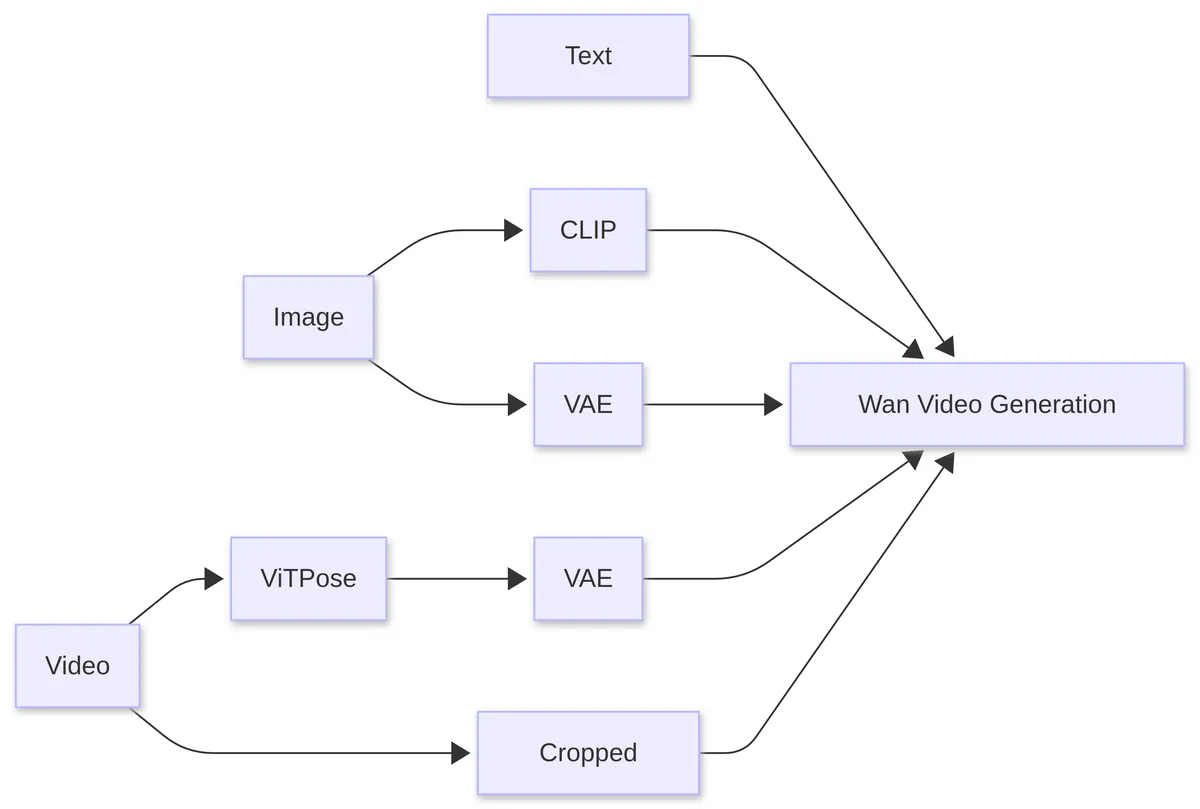
Processing pipeline for reference image and reference video inputs
The diagram above shows what we will go through. Ignore the text part, as we just want to focus on the image and video input.
I. Maintaining Character Consistency
..
- The reference image is fed into CLIP to extract feature hints indirectly. They are sent to the video model during inference as variable
clip_fea.
- If you do not know what CLIP is, it is a separate model that is trained on 400 million image-caption pairs to understand how visual content relates to text descriptions2.
- Before being sent to the model, the reference image is fed to CLIP's pretrained vision component to extract feature representations. Once inside, it acts as a global hint by providing the semantic and contextual information that may stay consistent when moving along frames.
- A limitation of using it is that visual details like scars, stickers, or unique markings may be missed because it focuses on semantically important features. 3
- Directly, the reference image is fed into the VAE to extract structured latent representations, which is sent to the video model during inference as tensor
[y].
- Latent representation is the lower-dimensional representation of the complex data that makes up that image.
- Inside the model, it merges into the noise latents to guide denoising toward a specific character, so character identity is preserved.
- To tell the video model which regions to preserve and which region the model has the freedom to sample new motion and content, a temporal mask (a binary signal of 1s and 0s) is utilized. This is combined with the latent representation of the image before being sent to the model. 4
II. Motion from Video to Animate Image
- The reference video is processed by ViTPose to extract body keypoints for each frame. These keypoints are fed into the VAE to extract structured latent representations, which are sent to the model during inference as variable
pose_latents.
If you do not know what ViTPose is, it is another external model that has been trained in human and animal pose estimation. It analyzes sampled frames from the reference video to detect body keypoints5.
Unlike the latent representations from the reference image, pose latents follow a separate pathway inside the model.
- The reference video is cropped to facial regions, saved as
face_pixel_values. It is used for transferring motion from facial expressions.
The summary of what is input to the model is as follows:
Observe Code:
               arg_c = {
                    "context": context,   #text prompt
                    "seq_len": max_seq_len,
                    "clip_fea": clip_context.to(dtype=torch.bfloat16, device=self.device), #CLIP encoded image
                    "y": [y],  #image latent representation
                    "pose_latents": pose_latents,  #latent representation of keyposes
                    "face_pixel_values": face_pixel_values # cropped facial region
                }
arg_c is the variable that will be sent to the video model
It is clear that clip_fea, y, and pose_latents are all VAE-encoded latents, and sent to the video model. But face_pixel_values (the cropped facial region) is passed directly.
What about Facial Expression?
I. Explanation of Math
Notice that facial expressions require a different approach. Directly learning motion transformation through a VAE is challenging, so Linear Motion Decomposition (LMD) is applied to simplify the process.
Each frame of the facial regions from the reference video (the 'driving video') is processed. It is compressed into a compact representation in latent space. Within this space exist semantic subspaces which are meaningful areas corresponding to an interpretable feature or attribute like age, pose, or expression
In InterFaceGAN,they show that it is possible to control how a network generates or modifies image output by working in that latent space.
Mathematically, any complex motion can be represented as a dictionary of motion vectors. In latent space, these vectors are constrained to form an orthogonal basis.
Each vector indicates a basic visual transformation and because the vectors are orthogonal, they represent independent semantic sub-spaces, meaning an individual component (like head nodding) cannot overlap with another component (eye movement).
To represent the intensity or strength of specific movement directions at any given point in time, scalar values are introduced consisting of . This would be the motion magnitude as represents the magnitude of ).
An interesting way to represent movement extracted from the driving video (our latent path) is given as:
We know that motion directions and magnitudes are linearly combined to form the latent path, which is important. In implementation, the motion dictionary is a learnable matrix (possibly a weight) to ensure movements are distinct. To capture the movement magnitude, how intense a movement direction was, a 5 layer MLP is implemented to predict it.
II. Code Dive
Code from Wan2.2 repo:
class Encoder(nn.Module):
	def __init__(self, size, dim=512, dim_motion=20):
		super(Encoder, self).__init__()

		# appearance netmork
		self.net_app = EncoderApp(size, dim)

		# motion network
		fc = [EqualLinear(dim, dim)]
		for i in range(3):
			fc.append(EqualLinear(dim, dim))

		fc.append(EqualLinear(dim, dim_motion))
		self.fc = nn.Sequential(*fc)

	def enc_app(self, x):
		h_source = self.net_app(x)
		return h_source

	def enc_motion(self, x):
		h, _ = self.net_app(x)
		h_motion = self.fc(h)
		return h_motion
Encoder class containing appearance and motion network
Frames from the driving video (facial region) pass through an encoder to extract latent representations. Instead of VAE encoding, which models full probabilistic distributions, the encoder contains a different encoder "EncoderApp" or self.net_app to for appearance. The motion network tries to calculates the intensity for a motion direction afterwards.
The motion network is a 5-layer MLP stored in the variable fc. It is created as a list containing a single EqualLinear layer with dimensions (512, 512). Then three additional EqualLinear layers with the same dimensions are appended. However, the final EqualLinear layer has dimensions of (512, 20) to prepare for the motion dictionary. Finally, self.fc converts the list of stacked layers into a single nn.Sequential module.
class Direction(nn.Module):
    def __init__(self, motion_dim):
        super(Direction, self).__init__()
        self.weight = nn.Parameter(torch.randn(512, motion_dim))

    def forward(self, input):

        weight = self.weight + 1e-8
        Q, R = custom_qr(weight)
        if input is None:
            return Q
        else:
            input_diag = torch.diag_embed(input)  # alpha, diagonal matrix
            out = torch.matmul(input_diag, Q.T)
            out = torch.sum(out, dim=1)
            return out
Direction class containing motion dictionary and function for performing LMD
Look at the Direction class where, in initialization, self.weight represents the motion dictionary.
In the forward() function, the input argument is the motion magnitude where LMD is run. Inside that function, the trainable parameter self.weight (the motion dictionary) is passed to custom_qr to ensure an orthogonal matrix. custom_qr performs QR decomposition, a linear algebra technique that factorizes a matrix into an orthogonal matrix Q and an upper triangular matrix R. However, we will only be using the variable Q which represents the orthogonal matrix.
If no motion magnitude is provided for a frame, we simply return the orthogonal motion directions as suggested from the paper. To perform LMD, we do a torch.matmul on the motion magnitude (as an alpha , diagonal matrix) and Q transposed (Q.T), then summed and returned like the formula.
Conclusion
We were able to discuss and go over the processing of the reference image and video. The image and video are turned into latent representations directly from the VAE to work inside the video model. Other models, like CLIP or VitPose were used in addition to just sending what the VAE encoded directly. So, that is what happens to the the input; it is processed, then acts as guide for the video generation process.
Mostly, I did a deep dive into facial region movement because it had an interesting method to extract motion from latent space using linear algebra concepts, and I wanted to see how it looked in code. I did not go deeply into its latent representations and interaction inside the video model, keeping the explanation at a higher level.
Hopefully, although my first article, you learned how those two inputs were made into a format the video model could understand, and create its final output. Thank you for reading.
Additional Sources
- https://arxiv.org/abs/2503.20314
- https://arxiv.org/abs/2509.14055
- https://arxiv.org/abs/2203.09043